Brainstorming facilitation
*For all Lucid plan types
Use this Lucidspark template to brainstorm as a group. After brainstorming, use Lucidchart to take action on your best ideas.
What is the brainstorming facilitation template?
This template helps you facilitate brainstorming sessions. Use it to spark new ideas, whether you’re brainstorming on your own or working with a group. The template helps you not only come up with ideas, but also put them into action so your creativity and insight don’t go to waste.
The brainstorming facilitation template pairs well with any work you’re doing in Lucidchart. When you’re done coming up with ideas, move to Lucidchart to create a process flow, wireframe, or anything else you need to map out.
Benefits of using the brainstorming facilitation template
If you need to create consensus among a team on how to move forward, this template can help. Use it to brainstorm, discuss and vote on ideas, organize everyone’s input, and assign action items. This means that you’ll have an easier time coming to unanimous conclusions and bringing ideas into action.
The template itself is easy to share with anyone you want to participate in the brainstorming session. You’ll be able to collaborate with as many or few people as needed, whether in person or remotely.
How to use the brainstorming facilitation template in Lucidspark
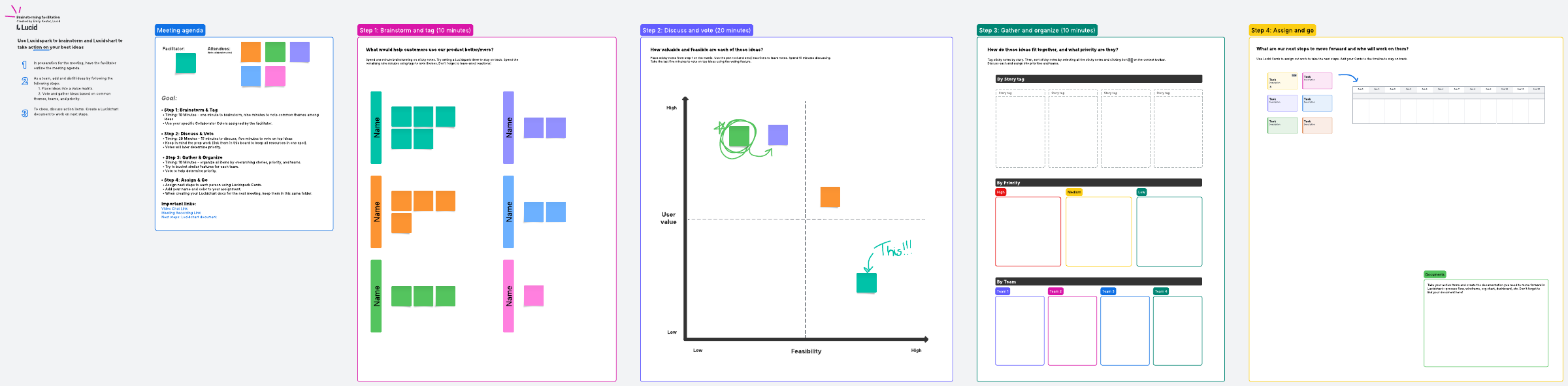
As facilitator, start the meeting on the right foot by outlining the meeting agenda so everyone knows what to expect and what the group needs to accomplish. You can keep everyone on track by using Facilitator Tools.
As your group brainstorms individually, assign them Collaborator Colors so it’s easy to tell who contributed each thought. After the group has come up with ideas, use the Tagging feature to note common themes and place them on the graph. Discuss the top ideas and vote on them.
Next, organize all the items by overarching stories, priority level, and the team they belong to. If you need to winnow these down further, hold another voting session.
Next, you’re ready to turn the group’s ideas into action. Assign next steps on Lucidspark Cards, and if you need to, insert a timeline into the template to plan out due dates. If you’re moving forward in Lucidchart, such as with an org chart or dashboard, remember to link to your new document.

Emily Keator
Senior Solutions Engineer, Lucid